Open baperrasta.com, tap the yellow “রাস্তায় নামেন” button, hold W to drive and use A/D to steer. Avoid buses and trucks, watch your battery and stop on yellow markings to charge. When the newspaper result appears, choose “আবার চালান” to try again.
Key takeaways
- You need a browser only: no account, payment or download for the original game.
- Learn the screen first: national loss top left, charge and map top right.
- Buses and trucks end the run; a red glow underneath is the warning.
- Change one habit per attempt and the learning curve flattens quickly.
Baper Rasta throws you straight onto a busy road, and because everything on screen is in Bengali, many players spend their first run just guessing. This walkthrough slows that down. We go through the game in the order you will meet it: finding the real game, starting a run, understanding the information on screen, learning what separates harmless damage from a run-ending mistake, and using the result screen to improve. At the end there is a short practice plan and a list of the mistakes new players make most often. Everything here comes from the game’s own on-screen instructions and public information; where we could not confirm something, we say so.
প্রথমে baperrasta.com-এ গিয়ে হলুদ “রাস্তায় নামেন” বোতামে চাপ দিন। W বা ↑ চেপে এগোন, A/D দিয়ে ঘোরান। বাস ও ট্রাক এড়িয়ে চলুন, ব্যাটারির দিকে নজর রাখুন এবং হলুদ দাগে থেমে চার্জ নিন।
Step 1 · Open the correct game
Use the “Play on the Original Website” button on any page of this guide. It opens the creator’s browser version at baperrasta.com in a new tab. Note the spelling: the real game is baperrasta.com, while this website, baparrasta.com, is only the fan guide. It is easy to mistype one for the other, so always use our buttons or type the address carefully.
The start screen is in Bengali. “রাস্তায় নামেন” (roughly “hit the road”) is the yellow button that begins a run. A smaller, download-shaped icon nearby is a separate button and is not the start button. Based on public information, the browser version needs no account, payment or download, and we do not host or recommend any APK. If a website offers an “official APK” of Baper Rasta, be suspicious; stick to the creator’s link.
One practical limitation: the original website blocks other sites from embedding it. That is why this guide cannot show the game inside a frame and always opens it in its own tab. It is a creator choice, not a bug on our side.
Step 2 · Start a run and find your bearings
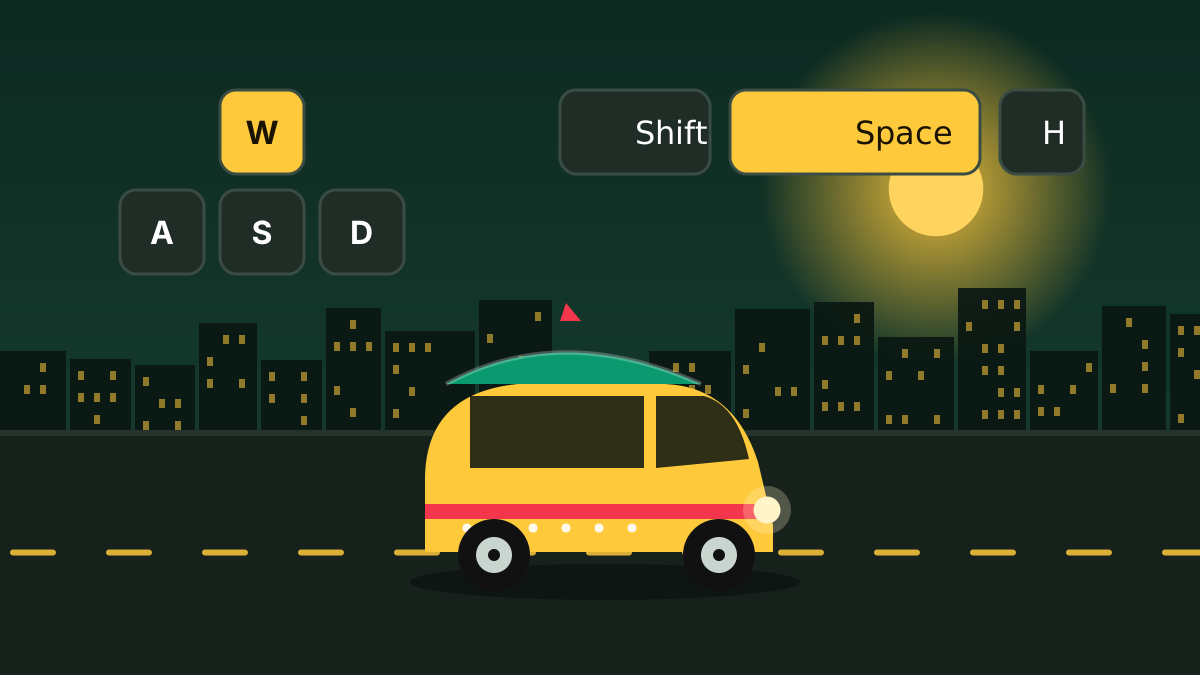
After you tap start, the camera follows a decorated auto-rickshaw. On desktop, click once inside the game area so it has keyboard focus, then briefly hold W or ↑ and release. Watch how the auto accelerates and coasts. Next try a small left or right input with A / D or the arrow keys while moving. The first goal is not to score; it is to feel how quickly the vehicle turns and how far it keeps rolling after you let go.
Use S or ↓ to slow down. Holding it after you have stopped can reverse the auto, so release it once you are still. On a touch screen, use the on-screen steering arrows, the “চালান” accelerator and the “ব্রেক” brake instead. If a key seems dead, the usual cause is lost focus; click the game again. Our controls page lists every key, including boost, horn, sound bomb and mute.
Step 3 · Read the score, charge and road
Before you drive far, spend ten seconds identifying the three things the game constantly shows you:
- জাতীয় ক্ষতি (top left): “national loss”, the in-game damage score, shown with the ৳ symbol. It starts at zero.
- চার্জ (top right): your battery percentage. The game starts you at full charge.
- Circular map (below the charge): helps you locate charging points. “মি” means metres, so a number followed by মি is a distance.
- Keyboard reminder over the road at the start: part of the original game, not an extra overlay from us.
This is satirical damage scoring, not a conventional clean-driving race. A short test collision can raise the counter by a four-digit amount in one go, but nobody has published the per-object values or a scoring formula, so be wary of any site that claims to know “the best way to get a high score”. We do not publish a score formula either, because we would have to invent one.
Step 4 · Separate charging from danger
The original instructions say to stop on yellow markings to charge. The safe habit is to approach slowly, brake into the marked area and confirm the battery percentage rises before you rely on the stop. Boost, on Shift or Space (or the lightning “টান” button on touch), uses more charge, so keep it short while you are learning.
Run-ending vehicles: the original warns that buses and trucks are fatal. A red light beneath a vehicle is a danger cue. People can also chase and catch the driver.
Pink markings belong to the game’s satirical police “tea-money” interaction and are not a battery refill. New players often confuse the two colours, so read the dedicated charging guide and the dangers guide before you rely on either.
Step 5 · Avoid the first-run traps
- Holding a turn too long can leave you facing the curb or median. Use short steering taps.
- Do not boost toward a bus just because smaller collisions add to the score.
- Stopping for a long time after a collision gives pursuers a chance to catch you.
- No horn or sound-bomb key is a guaranteed escape button, so do not rely on them.
- Do not leave the tab: there is no documented pause, and reloading can end the run.
Step 6 · Read the result and try again
When your driver is caught, the game shows a Bengali newspaper-style result with your final national-loss amount. “আবার চালান” starts another run, and the home button returns to the start screen. Do not skip the result page. It is the only feedback the game gives you about what happened, so use it: note what ended the run (a fatal vehicle, a pursuit, an overshoot) and decide on one change for the next attempt. Smoother turning, spotting dangerous vehicles earlier and finding a charging marker are the three improvements that matter most at the beginning.
Sharing your result
The result screen includes “ছবি শেয়ার” (share image) and “ভিডিও শেয়ার” (share video) buttons next to retry and home. Use them on the original result screen and keep that tab open until you finish. Image and video export, device share sheets and posting to social networks depend on your browser and phone, and a shared picture does not mean the online leaderboard accepted your run; those are separate features, explained on the Most Wanted page.
A 10-run learning plan
Because there is no tutorial, a deliberate practice routine is the quickest way to improve. Try this over your first ten runs, changing only one thing at a time:
Runs 1–2: just drive
Use ordinary acceleration and tiny steering taps. Ignore the score. Learn the camera and the turning radius.
Runs 3–4: scan for danger
Look for buses, trucks and the red glow underneath. Practise choosing a clear lane before every straight.
Runs 5–6: manage charge
Glance at the battery regularly, note where the map points and practise one controlled stop on a yellow marking.
Runs 7–8: add boost
Use short boost bursts only on clear road, and release before you steer. Notice how much charge each burst costs.
Runs 9–10: handle pursuit
After a collision, keep moving instead of stopping. Watch the road as well as the meters and compare your totals with your first runs.
The most common beginner mistakes
Playing in the wrong tab
Keys do nothing if the game does not have focus. Click inside the game before pressing anything.
Chasing score too early
Crashing on purpose before you can steer teaches nothing. Learn control first, then chaos.
Ignoring the battery
Boosting constantly leaves no margin. Check the meter between traffic decisions.
Confusing pink and yellow
Yellow is charging. Pink is the police joke. They are not interchangeable.
Stopping after damage
Idling lets pursuers close in. Keep moving unless you are deliberately charging.
Trusting unofficial downloads
Only the creator’s browser link is the game. Avoid APK offers and “mod” builds.
What is verified and what is not
Our checks covered short desktop runs and an Android-style touch viewport in a desktop browser. They did not cover a physical phone, iOS, a controller, offline installation or long play sessions. We also did not submit scores to the online board, complete a battery refill timing or verify per-object damage values. If your experience differs, please let us know; the game may have changed, and reader reports are how we keep the guide current.
Frequently asked questions
How do I start Baper Rasta?
Open baperrasta.com in your browser and tap the yellow “রাস্তায় নামেন” button on the start screen. The game begins immediately; there is no account or download.
What is the goal of Baper Rasta?
There is no finish line. The game tracks an in-game damage score called national loss (জাতীয় ক্ষতি) in ৳, and your run ends when you hit something fatal or the driver is caught.
How do I drive and steer?
On desktop, hold W or Up Arrow to accelerate and tap A / D or Left / Right Arrow to steer. On touch screens use the arrow buttons and the “চালান” accelerator.
Why did my run end so quickly?
Usually a bus or truck, or a pursuit after stopping following a collision. Scan for the red glow under large vehicles and keep moving after damage.
Should I use boost all the time?
No. Boost uses more battery and reduces reaction time. Use short bursts on clear road and release before your next steering decision.
How do I retry after a run?
On the newspaper-style result screen choose “আবার চালান” (play again), or use the home button to return to the start screen.
Next: learn every key on the Controls page, then work through the tips for better runs. Playing on a phone? Read the mobile guide.
An independent fan team. Facts come from the game’s own on-screen instructions and public sources, and anything unverified is labelled. Last reviewed 30 October 2026. See our editorial standards or send a correction.